"El androide libre" is a great spanish android related blog. Now they are making a contest to win a Nexus One!
You have more info at:
www.elandroidelibre.com
jueves, 13 de mayo de 2010


jueves, 10 de diciembre de 2009
Google latitude on Maemo5 (n900)
I've just received my n900 (thanks nokia) and here is a tip to use google latitude:
You just have to install firefox mobile (fennec), and go to: http://maps.google.es/maps/m?mode=latitude
This is the webapp for iphone, uses HTML5 (thats because you need firefox mobile)
Soon how to sync with google calendar/contacts, and how to have "gmail push".
You just have to install firefox mobile (fennec), and go to: http://maps.google.es/maps/m?mode=latitude
This is the webapp for iphone, uses HTML5 (thats because you need firefox mobile)
Soon how to sync with google calendar/contacts, and how to have "gmail push".
jueves, 29 de octubre de 2009
HTC magic contest (vodafone Spain)
In this site of Android are making a contest of an HTC Magic from vodafone (Spain). Contestants must be in Spain. If you like it you can participate here:
http://and.roid.es/androides-sorteo-aniversario-htc-magic-vodafone.html
http://and.roid.es/androides-sorteo-aniversario-htc-magic-vodafone.html
sábado, 5 de septiembre de 2009
SpeedLimit 0.2
And here is the second version of speedlimit.
Changelog:
- audio alarm when you go faster than limit
- now gps speed updates every 0.5 seconds
- Label with the selected speedlimit
- two buttons to increase/decrease speedlimit in 5 km/h
- initial work to support non-tablet (netbooks, etc)
- many GUI improvements
- many bug fixes
TODO:
- Support miles per hour
- Configurable buttons (for different speeds)
- Make it more beautiful (bigger font, and more)

Changelog:
- audio alarm when you go faster than limit
- now gps speed updates every 0.5 seconds
- Label with the selected speedlimit
- two buttons to increase/decrease speedlimit in 5 km/h
- initial work to support non-tablet (netbooks, etc)
- many GUI improvements
- many bug fixes
TODO:
- Support miles per hour
- Configurable buttons (for different speeds)
- Make it more beautiful (bigger font, and more)

domingo, 23 de agosto de 2009
New version of motion
Hi, I've updated my packages for motion, here you have the files: https://garage.maemo.org/frs/?group_id=412
It's in my plans to make a gui to configure and manage motion easily. Enjoy!
It's in my plans to make a gui to configure and manage motion easily. Enjoy!
viernes, 21 de agosto de 2009
First release of Speedlimit
I've wrote a very basic software that helps you to not go faster than you should. In this first release you have only three buttons to select a maximum speed, when you go faster, it warns you with a red background. I have a long TODO, please be patients.
You can download it here: http://garage.maemo.org/frs/?group_id=1017
Many TODO in my mind:
- Support miles per hour
- Sound alarm
- Configurable buttons (for different speeds)
- Make it more beautiful (bigger font, and more)
Here a screenshot:

You can download it here: http://garage.maemo.org/frs/?group_id=1017
Many TODO in my mind:
- Support miles per hour
- Sound alarm
- Configurable buttons (for different speeds)
- Make it more beautiful (bigger font, and more)
Here a screenshot:

domingo, 18 de mayo de 2008
How to "enable" uPNP in canola2:
Here it is how to "enable" uPNP in canola2:
1- first install fuse and djmount (https://garage.maemo.org/frs/?group_id=681)
2- mkdir /home/user/MyDocs/.sounds/djmount
3- djmount -o allow_other /home/user/MyDocs/.sounds/djmount
4- go to canola2 settings and activate it to watch in internal memory
5- refresh library
This should work, it's not a good solution, it's not fast but it works.
I have tested it with 8 gb of music, and it works great, not so slow.
If canola doesn't show the uPNP contents some "ls" in the /home/user/MyDocs/.sounds/djmount/ or a "find" can help.
1- first install fuse and djmount (https://garage.maemo.org/frs/?group_id=681)
2- mkdir /home/user/MyDocs/.sounds/djmount
3- djmount -o allow_other /home/user/MyDocs/.sounds/djmount
4- go to canola2 settings and activate it to watch in internal memory
5- refresh library
This should work, it's not a good solution, it's not fast but it works.
I have tested it with 8 gb of music, and it works great, not so slow.
If canola doesn't show the uPNP contents some "ls" in the /home/user/MyDocs/.sounds/djmount/ or a "find" can help.
Asus EEE at 600 Mhz vs Asus EEE at 900 Mhz (part I)
I have made some benchmarks with the Asus eee 701 (really 702 but it's basically the same hardware, it only change the SSD) to view the real improvment of overclockit (put the cpu at its native clock). The benchmarks tests the SSD (disk), RAM, CPU and graphics (at the second part of this article I will post Benchmarks of games).
Here it's the hardware information:
Asus EEE 600:
Processor: Intel Celeron M 900MHz @ 0.63GHz (Total Cores: 1)
Motherboard: ASUSTeK 702
Chipset: Intel Mobile 915GM/PM/GMS/910GML
System Memory: 1002MB
Disk Space: 8GB
Graphics: Intel Mobile 915GM/GMS/910GML
Screen Resolution: 800x480
Asus EEE 900:
Processor: Intel Celeron M 900MHz @ 0.90GHz (Total Cores: 1)
The rest is the same.
Software Information (the same at both):
OS: Ubuntu 8.04
Kernel: 2.6.22-14-generic (i686)
X.Org Server: 1.4.0.90
OpenGL: 1.3 Mesa 7.0.3-rc2 (i915)
And the results of benchmarks:
Here it's the hardware information:
Asus EEE 600:
Processor: Intel Celeron M 900MHz @ 0.63GHz (Total Cores: 1)
Motherboard: ASUSTeK 702
Chipset: Intel Mobile 915GM/PM/GMS/910GML
System Memory: 1002MB
Disk Space: 8GB
Graphics: Intel Mobile 915GM/GMS/910GML
Screen Resolution: 800x480
Asus EEE 900:
Processor: Intel Celeron M 900MHz @ 0.90GHz (Total Cores: 1)
The rest is the same.
Software Information (the same at both):
OS: Ubuntu 8.04
Kernel: 2.6.22-14-generic (i686)
X.Org Server: 1.4.0.90
OpenGL: 1.3 Mesa 7.0.3-rc2 (i915)
And the results of benchmarks:
CPU (super-pi, less is better):

RAM (ramspeed, more is better):

Graphics (render-bench, less is better) really it's a test of cpu+graphics:

Disk (iozone):
 Conclusion:
At 900 mhz the asus EEE works faster, not only in cpu, the ram is working faster too. All the system is smoother and faster, i highly recomend to overclock the Asus EEE.
The tests are made with the great PTS 0.7.0. In the second part of this article I will made Games benchmarks.

RAM (ramspeed, more is better):

Graphics (render-bench, less is better) really it's a test of cpu+graphics:

Disk (iozone):
 Conclusion:
At 900 mhz the asus EEE works faster, not only in cpu, the ram is working faster too. All the system is smoother and faster, i highly recomend to overclock the Asus EEE.
The tests are made with the great PTS 0.7.0. In the second part of this article I will made Games benchmarks.
martes, 8 de abril de 2008
Flash boot vs SD boot on n8x0
Video comprasion of the booting process of OS2008 in the internal flash memory vs a minisdhc memory.
Flash boot vs SD boot on n8x0 from Oriol Jimenez on Vimeo.
jueves, 13 de marzo de 2008
New Feed, please readers update-it
Hi! Behind Maemo lines have a new feed:
http://feeds.feedburner.com/BehindMaemoLines
Please update it in your RSS reader, Thanks!
http://feeds.feedburner.com/BehindMaemoLines
Please update it in your RSS reader, Thanks!
Screen rotation support on OS2008 (n8x0)
os2008 rotation from Oriol Jimenez on Vimeo.
I succesfully actived the screen rotation support on my n810 (it works on n800). Here's how i did it:
1st - Download these files:
http://sse2.net/rotate/kernel-rx-34_2.6.21.0-osso71-randr
http://sse2.net/rotate/pool/main/libx/libxrandr/libxrandr2_1.2.2-1_armel.deb
http://sse2.net/rotate/pool/main/x/xorg-server/xserver-xomap_1.3.99.0~git20070321-0osso20074202-randr01_armel.deb
http://sse2.net/rotate/pool/main/r/rotate-sb-plugin/rotate-sb-plugin_0.1-1_armel.deb
2nd - flash with the new kernel (make a back-up before doing this step, this flash ONLY the kernel, not your filesystem (programs and files)):
   # ./flasher-3.0 -f -k kernel-rx-34_2.6.21.0-osso71-randr

3rd - install apps:
(in the n8x0)
# sudo gainroot
# dpkg -i --force-all *deb (execute this in the directori containing the *deb files downloaded in step 1.
# reboot
Thats all! It should work.These instrucions and files are from: http://sse2.net/rotate/
viernes, 11 de enero de 2008
usbserial
pl2303.ko and usbserial.ko are needed to connect any gadget through USB with a cable "USB to serial".
With this you can programme for your gadgets, transfer data, and control a lot of things.
The only you have to do is download usbserial.ko and pl2303.ko and type into n8X0 terminal (root):
insmod usbserial.ko
insmod pl2303.ko
and fun!
here I put the files:
http://www.internettablettalk.com/forums/showthread.php?t=14877
With this you can programme for your gadgets, transfer data, and control a lot of things.
The only you have to do is download usbserial.ko and pl2303.ko and type into n8X0 terminal (root):
insmod usbserial.ko
insmod pl2303.ko
and fun!
here I put the files:
http://www.internettablettalk.com/forums/showthread.php?t=14877
OS2008 Repositories
Here is the list of my "sources.list":
deb http://catalogue.tableteer.nokia.com/certified/ chinook user
deb http://catalogue.tableteer.nokia.com/non-certified/ chinook user
deb http://repository.maemo.org/extras/ chinook free non-free
deb http://repository.maemo.org/extras chinook free
deb http://maemo-hackers.org/apt/ mistral main
deb http://idefix.go-nix.ca/nix/ chinook pidgin
deb http://repository.innologies.com/ chinook user
deb http://www.cobb.uk.net/apt chinook user
deb http://www.cobb.uk.net/apt chinook experimental
deb http://repostory.maemo.org/extras/ chinook free
deb http://modest.garage.maemo.org/repos/ chinook mail
deb http://repository.maemo.org/ chinook free non-free
deb http://repository.maemo.org/extras/ chinook free non-free
deb http://catalogue.tableteer.nokia.com/certified/ chinook user
deb http://catalogue.tableteer.nokia.com/non-certified/ chinook user
deb http://catalogue.tableteer.nokia.com/updates/chinook/ ./
deb http://repository.maemo.org/ chinook free non-free
deb http://maemo-hackers.org/apt mistral main
deb http://elkins.org/packages chinook main
deb http://maemo-hackers.org/apt chinook main
deb http://www.fbreader.org/maemo chinook user
deb http://www.anderenen.de/repository chinook free
deb http://repository.maemo.org/extras-devel/ chinook free
deb http://www.cobb.uk.net/apt/ chinook user
deb http://eko.one.pl/maemo bora user
deb http://idefix.go-nix.ca/nix chinook pidgin
deb http://repository.innologies.com/ chinook user
deb http://repository.maemo.org/ bora free non-free
deb http://maemo.lancode.de chinook user themes
deb http://browser-extras.garage.maemo.org/browser-extras/ chinook browser-extra
s
deb http://packages.gizmoproject.com/chinook chinook user
deb http://tuomas.kulve.fi/debian chinook maemo
deb http://www.mulliner.org/nokia770/repository/ chinook free
deb http://people.debian.org/~tschmidt/maemo/chinook/ ./
deb http://www.claws-mail.org/maemo chinook user
deb http://olya.com/maemo/ chinook user
deb http://maemo.o-hand.com/packages/ chinook/
deb http://jalimo.evolvis.org/repository/maemo/ chinook user
deb http://modest.garage.maemo.org/repos/ chinook mail
deb http://apt.igalia.com/ chinook vagalume
deb http://mango.dia.unisa.it/maemo chinook free
deb http://repostory.maemo.org/extras chinook free
deb http://repostory.maemo.org/ chinook free non-free
deb http://download.talinux.tal.org/pub/maemo chinook free
deb http://repository.maemo.org/rtcomm chinook free
deb http://people.mozilla.org/~blassey chinook extras
deb http://packages.collabora.co.uk/maemo chinook haze salut idle
deb http://us.tabletrepo.com/ chinook testing
deb http://repo.maemo.chatonka.com chinook testing
deb http://austinche.name/maemo chinook/
deb http://repository.axique.de/ chinook user
deb ftp://foolab.org/pub/apt chinook spell arabic main
deb http://qt4.garage.maemo.org/ chinook user
deb http://maemo.jabber.dk/pidgin-n800-led-plugin chinook user
deb http://mg.pov.lt/770 chinook experimental other user
deb http://catalogue.tableteer.nokia.com/certified/ chinook user
deb http://catalogue.tableteer.nokia.com/non-certified/ chinook user
deb http://repository.maemo.org/extras/ chinook free non-free
deb http://repository.maemo.org/extras chinook free
deb http://maemo-hackers.org/apt/ mistral main
deb http://idefix.go-nix.ca/nix/ chinook pidgin
deb http://repository.innologies.com/ chinook user
deb http://www.cobb.uk.net/apt chinook user
deb http://www.cobb.uk.net/apt chinook experimental
deb http://repostory.maemo.org/extras/ chinook free
deb http://modest.garage.maemo.org/repos/ chinook mail
deb http://repository.maemo.org/ chinook free non-free
deb http://repository.maemo.org/extras/ chinook free non-free
deb http://catalogue.tableteer.nokia.com/certified/ chinook user
deb http://catalogue.tableteer.nokia.com/non-certified/ chinook user
deb http://catalogue.tableteer.nokia.com/updates/chinook/ ./
deb http://repository.maemo.org/ chinook free non-free
deb http://maemo-hackers.org/apt mistral main
deb http://elkins.org/packages chinook main
deb http://maemo-hackers.org/apt chinook main
deb http://www.fbreader.org/maemo chinook user
deb http://www.anderenen.de/repository chinook free
deb http://repository.maemo.org/extras-devel/ chinook free
deb http://www.cobb.uk.net/apt/ chinook user
deb http://eko.one.pl/maemo bora user
deb http://idefix.go-nix.ca/nix chinook pidgin
deb http://repository.innologies.com/ chinook user
deb http://repository.maemo.org/ bora free non-free
deb http://maemo.lancode.de chinook user themes
deb http://browser-extras.garage.maemo.org/browser-extras/ chinook browser-extra
s
deb http://packages.gizmoproject.com/chinook chinook user
deb http://tuomas.kulve.fi/debian chinook maemo
deb http://www.mulliner.org/nokia770/repository/ chinook free
deb http://people.debian.org/~tschmidt/maemo/chinook/ ./
deb http://www.claws-mail.org/maemo chinook user
deb http://olya.com/maemo/ chinook user
deb http://maemo.o-hand.com/packages/ chinook/
deb http://jalimo.evolvis.org/repository/maemo/ chinook user
deb http://modest.garage.maemo.org/repos/ chinook mail
deb http://apt.igalia.com/ chinook vagalume
deb http://mango.dia.unisa.it/maemo chinook free
deb http://repostory.maemo.org/extras chinook free
deb http://repostory.maemo.org/ chinook free non-free
deb http://download.talinux.tal.org/pub/maemo chinook free
deb http://repository.maemo.org/rtcomm chinook free
deb http://people.mozilla.org/~blassey chinook extras
deb http://packages.collabora.co.uk/maemo chinook haze salut idle
deb http://us.tabletrepo.com/ chinook testing
deb http://repo.maemo.chatonka.com chinook testing
deb http://austinche.name/maemo chinook/
deb http://repository.axique.de/ chinook user
deb ftp://foolab.org/pub/apt chinook spell arabic main
deb http://qt4.garage.maemo.org/ chinook user
deb http://maemo.jabber.dk/pidgin-n800-led-plugin chinook user
deb http://mg.pov.lt/770 chinook experimental other user
jueves, 10 de enero de 2008
driver gspca for n800
I just compiled gspca for n800. I don't know if it goes correctly. I try to put at N800 on os2008 with insmod and seem to load corectly, In /dev/video apears video0 and video1, but I don't know if before already apear. If anyone can help to make gspca run on n800 that was great. I want to put a labtec webcam on n800 with usb-host. I think there are not almost power to start the camera but with a powered hub I think it could work.
Oriol and I have a project to put night vision on N800, and with the modified webcam(without infrared filter), infrared light and the LCD of N800 we think it's possible. Thanks a lot.
here I put the module:
http://www.internettablettalk.com/forums/showthread.php?p=124679#post124679
Oriol and I have a project to put night vision on N800, and with the modified webcam(without infrared filter), infrared light and the LCD of N800 we think it's possible. Thanks a lot.
here I put the module:
http://www.internettablettalk.com/forums/showthread.php?p=124679#post124679
miércoles, 19 de diciembre de 2007
How to "crack" the wayfinder in OS2008
ATTENTION: This is only for investigations and study propose, please if you like wayfinder, buy it.
When you open wayfinder, you can get a trial of 7 days, after that you have to buy it.
How can we get a "eternal trial"? easy, when this 7 days finished (really it's not necessary to wait, you can renew at 5 (for ex.) days left), follow these steps:
Remember $ means run as user, and # means run as root ($ sudo gainroot).
1 - $ rm -Rf /home/user/.navicore ( for me, this don't delete any map or any POI)
2 - Install macchanger (OS2007 version have to work fine) (this it's only necesary the first time, if you don't have macchanger yet)
3 - Go to Offline mode
4 - # macchanger -r wlan0
5 - Connect to Internet
6- Open wayfinder and get a new 7 days trial
Possibly i will made a script for to this, but is so easy, it's not?
Please comment your results, at least it work for me.
macchanger: http://maemo-hackers.org/apt/pool/main/m/macchanger/macchanger_1.5.0-1_armel.deb
When you open wayfinder, you can get a trial of 7 days, after that you have to buy it.
How can we get a "eternal trial"? easy, when this 7 days finished (really it's not necessary to wait, you can renew at 5 (for ex.) days left), follow these steps:
Remember $ means run as user, and # means run as root ($ sudo gainroot).
1 - $ rm -Rf /home/user/.navicore ( for me, this don't delete any map or any POI)
2 - Install macchanger (OS2007 version have to work fine) (this it's only necesary the first time, if you don't have macchanger yet)
3 - Go to Offline mode
4 - # macchanger -r wlan0
5 - Connect to Internet
6- Open wayfinder and get a new 7 days trial
Possibly i will made a script for to this, but is so easy, it's not?
Please comment your results, at least it work for me.
macchanger: http://maemo-hackers.org/apt/pool/main/m/macchanger/macchanger_1.5.0-1_armel.deb
viernes, 9 de noviembre de 2007
Volleytux version 1.0 for n800!
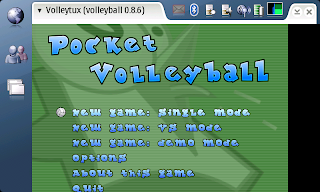 I'm just finished the version 1.0 of volleytux that allows users to play in multiplayer and single player .
KEYS for player 1:
d-pad to move
fullscreen key to accept and select
menu key to go forward
keys for player 2:
zoom out key to go left
zoom in key to go right
fullscreen key to jump
home key to accept
if you are interested visit the page:
https://garage.maemo.org/frs/?group_id=446
I want to say that I haven't been accepted in the n810 device program, but Uri yes. We start to develop for n810 earlier. Now the priority of the donations goes to n770. Thanks for the help!
jueves, 8 de noviembre de 2007
ResetWlan 1.0
First fully working version of resetwlan. Now you can finally use your wifi connection after you have putted it in promiscuous mode. This release fix a very SERIOUSLY bug with the sudoers file, it's HIGHLY recommended to do an upgrade to 1.0.
This software ables you to navigate through internet after you are been using airodump, kismet, or others alike software. Possibly tomorrow i will package airodump and kismet, modifying them to auto-restart the wifi after using them.
To download resetwlan:
https://garage.maemo.org/frs/?group_id=417
This software ables you to navigate through internet after you are been using airodump, kismet, or others alike software. Possibly tomorrow i will package airodump and kismet, modifying them to auto-restart the wifi after using them.
To download resetwlan:
https://garage.maemo.org/frs/?group_id=417
New version of motion released
New version of motion release, in this version, both motion and spy version have been unified in a single package. The Main added feature is the menumotion, a first release of something that lately will become a fully GUI. This menumotion have to been executed in terminal, and it can configure the place where motion stores the images, and turn on and off the Spy mode. Remember that spy mode makes motion auto-run when the cam is unplugged (only N800).
The directory where your images saves is/.motion-caputre Where directory is chosen in motionmenu.
Here two screenshots of motionmenu:


https://garage.maemo.org/frs/?group_id=412
The directory where your images saves is
Here two screenshots of motionmenu:


domingo, 4 de noviembre de 2007
porn-get on n800!!
I'm trying to port porn-get into n800, but I have several problems, firstly I port lynx because porn-get needed, next I have problems updating and installing with porn-get (porn-get install and porn-get update) I think is because porn-get use bash scripts and n800 goes with sh. I put bash on n800 and I have already some bugs, but I'm near the solution(with scratchbox goes now).
I want to do a GUI for do better the program and for users ends.
I want to do a GUI for do better the program and for users ends.
WepAttack
WepAttack is a WLAN open source Linux tool for breaking 802.11 WEP keys. This tool is based on an active dictionary attack that tests millions of words to find the right key. Only one packet is required to start an attack.
with wlandecrypter is a good combination to break WEP keys in minuts. With only one packet you can get the password:
wlandecrypter bssid essid | wepattack -f file.cap
like I explain at the post http://behindmaemolines.blogspot.com/2007/11/wlandecrypter.html
The bad thing is that wlandecrypter only goes in SPAIN with telefonica routers.
I didn't tested yet, any suggestion feel free to comment.
with wlandecrypter is a good combination to break WEP keys in minuts. With only one packet you can get the password:
wlandecrypter bssid essid | wepattack -f file.cap
like I explain at the post http://behindmaemolines.blogspot.com/2007/11/wlandecrypter.html
The bad thing is that wlandecrypter only goes in SPAIN with telefonica routers.
I didn't tested yet, any suggestion feel free to comment.
Suscribirse a:
Entradas (Atom)